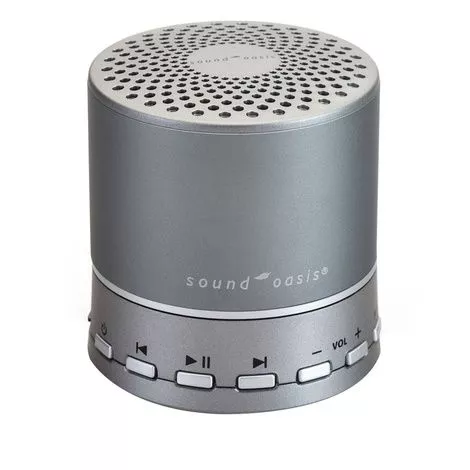
Sound Oasis Bluetooth Sound System Features
- Stream new sounds or music from any Bluetooth enabled device (iPhone, iPod, iPad or MP3) for exceptional versatility
- 30ft Bluetooth wireless range
- Audio input jack to plug in a cell phone or MP3 player and play music through the speaker
- 3.5mm headphone or speaker jack
- Includes Micro USB cord for recharging or use with A/C adapter (not included) for continuous use
- Dimensions: 2.75 x 2.5 inch.
- Built-in micro SD card is preloaded with 10 sounds
- Brown noise
- Gentle surf
- Heartbeat
- Ocean surf
- Rocky mountain stream
- Steady rain
- Summer night
- Thunder and Rain
- White noise
- Woodland
What to buy with Sound Oasis Bluetooth Therapy System Works
- Aquasonic Ultrasound Gel
- BioCon Ultrasound Transmission Gel For BioCon Bladder Scanner
- Fabrication Point Relief LidoSpot Pain Relieving Patch
How Sound Oasis Sleep Therapy System Works?
Stream New Sounds Or Music from Your Music Library
- Turn on your BST-100 sleep machine by pressing and holding down the BST-100 POWER button for 3 seconds
- Your BST-100 sleep sound machine will enter the Bluetooth streaming mode by default. The Bluetooth LED on your BST-100 will blink to show that it is discoverable.
- On your Bluetooth enabled device, turn Bluetooth on, locate the Bluetooth device list and select the device named BST-100. Pair your BST-100 with your Bluetooth enabled device.
- The Bluetooth LED will light up on your BST-100 sleep therapy machine and you will hear a Bluetooth pairing mode “blip” to indicate that you are in the Bluetooth streaming mode.
- Press play on your Bluetooth device to play the streamed music/sound.
Stream New Sounds Or Music from Sound Oasis APPs
- Purchase any Sound Oasis APP from Apple;s iTune store.
- Turn on your BST-100 sleep machine by pressing and holding down the BST-100 POWER button for 3 seconds.
- On your Bluetooth enabled device, turn Bluetooth on, locate the Bluetooth device list and select the device named BST-100. Pair your BST-100 with your Bluetooth enabled device.
- The Bluetooth LED will light up on your BST-100 sleep machine and you will hear a Bluetooth pairing mode “blip” to indicate that you are in the Bluetooth streaming mode.
- Press play on the Sound Oasis APP to play the streamed music/sound.
Sound Oasis Bluetooth Sleep Sound Therapy System Manual